Animation as a pure function of time.
kinemo is a Python library for explanatory animations: math, algorithms, engineering, data. Your script runs once and compiles to a timeline. A Rust core evaluates any instant of it, so the preview scrubs without re-running your code, renders spread across cores, and the same source gives the same pixels.
1import kinemo as k2 3 4def f(x: float) -> float:5 return 0.15 * x**3 - 0.9 * x + 1.56 7 8@k.scene9def derivative(s: k.Scene):10 ax = k.Axes(x=(-3, 3, 1), y=(-1, 5, 1), grid=True, labels=("x", "y")).place(at="center")11 x = k.signal(-2.0)12 curve = ax.plot(f, color=k.YELLOW)13 dot = k.Dot(r=0.1, fill=k.RED).place(at=curve.point_at(x))14 tan = curve.tangent_at(x, length=3, stroke=k.RED)15 label = k.Text(lambda: f"f'({x():.1f}) = {curve.slope_at(x)():.2f}", size=0.35).place(at="top", margin=0.6)16 s.play(k.draw(ax), k.draw(curve))17 s.play(k.fade_in(dot, tan, label), duration=0.5)18 s.play(x.to(2.5), duration=3)19 s.play(ax.zoom_to(x=(0, 3), y=(0, 4)), duration=1.5)20 s.wait(0.5)The bars are this scene's timeline, as kinemo check reports it. Click one to jump
there: the line that scheduled it lights up. Drag the track to scrub.
One build, then any frame
The scene function is not a render loop. It runs once and produces data: a serializable scene of signals with timelines. Everything after that is native code reading that data.
Build
Python runs your scene function once.
s.playands.waitmove a cursor; objects, signals and animations are recorded, not drawn.python/kinemo
Resolve
Events and handlers (
k.when,s.wait_for, simulations) are settled to a fixed point, then visual lints sample the result.kinemo-resolve
Evaluate
Any instant, on demand: timelines and easing, traced expressions, constraint layout, shaped text, LaTeX through typst.
kinemo-eval, kinemo-layout, kinemo-text, kinemo-math
Render
A display list rasterized by tiny-skia (Vello on the GPU for the preview), encoded by ffmpeg to MP4, WebM, MOV or GIF.
kinemo-render, kinemo-encode
What that buys you
Scrubbing is free. The preview asks the Rust server for the frame at t; Python is not involved until you save.
Lambdas are compiled, not called. k.Text(lambda: f"{x():.1f}") and .map(...) are traced once into
native expressions. Opaque Python is allowed, explicitly, through k.python(fn).
Reproducible to the byte. The CPU renderer is the reference: the golden frames in the test suite are compared byte for byte, and video uses bitexact encoder flags.
$ kinemo check derivative.py
derivative.py — scene 'derivative' — 7.0 s — ok
timeline
   0.00– 1.00  draw(ax), draw(curve)                    derivative.py:16
   1.00– 1.50  fade_in(dot, tan, label)                 :17
   1.50– 4.50  x.to(value)                              :18
   4.50– 6.00  ax.to(x_range, y_range)                  :19
Mistakes come with the fix
Every problem has a stable code, the offending line and the related one, the instant on the
timeline and numbered fixes. kinemo check --fix applies the safe ones, kinemo explain K0401 gives the long form, and Manim habits are recognized and translated.
$ kinemo check constraint.py
constraint.py — scene 'constraint' — — — 1 error
errors
  K0401 error: 'title' cannot animate x: the axis is held by a constraint
    --> constraint.py:9    s.play(title.to(x=3))
    --> constraint.py:7    title = k.Text("hypotenuse", size=0.5).place(above=tri, gap=0.3)   ← constraint here
     t = 0.00 s
    fix 1: change the constraint with an animation
           s.play(title.to_place(right_of=...))
    fix 2: release it and animate freely
           s.play(title.to(x=..., unpin=True))
    more: kinemo explain K0401
$ kinemo check manim.py
manim.py — scene 'manim_habits' — — — 1 error
errors
K1101 error: 'Create' is a Manim name. In kinemo: k.draw(obj)
--> manim.py:7 s.play(Create(circle))
fix: use
k.draw(obj)
more: kinemo explain K1101Edit the code from the preview
kinemo dev scene.py opens a browser preview with hot reload. Click an object and
every prop says where it came from: the line that wrote it, or default. Literals are
editable with a widget for their type, and the edit goes back to your file.
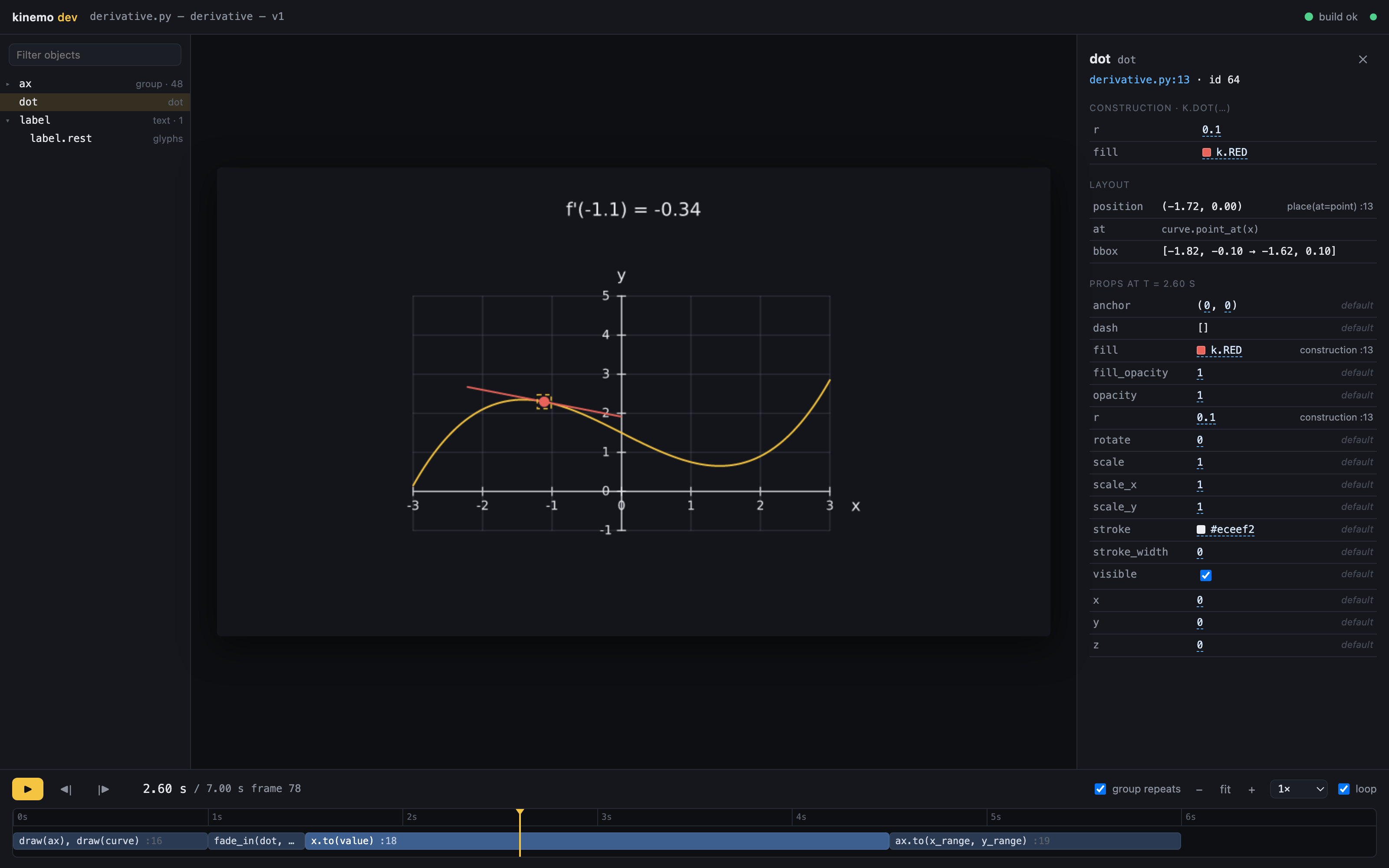
- Drag a number and the scene rebuilds from the edited text as you move; the file is written once, when you let go.
- Selects for enumerations, a palette for colors (written as
k.RED), two fields for points, thek.easecurves for easings. - Only the literal's characters change. Formatting and comments stay yours, and a value your code computes is shown, not overwritten.
- Drag the selected object on the frame to rewrite the position that places it.
- dot = k.Dot(r=0.1, fill=k.RED).place(at=curve.point_at(x))+ dot = k.Dot(r=0.18, fill=k.RED).place(at=curve.point_at(x))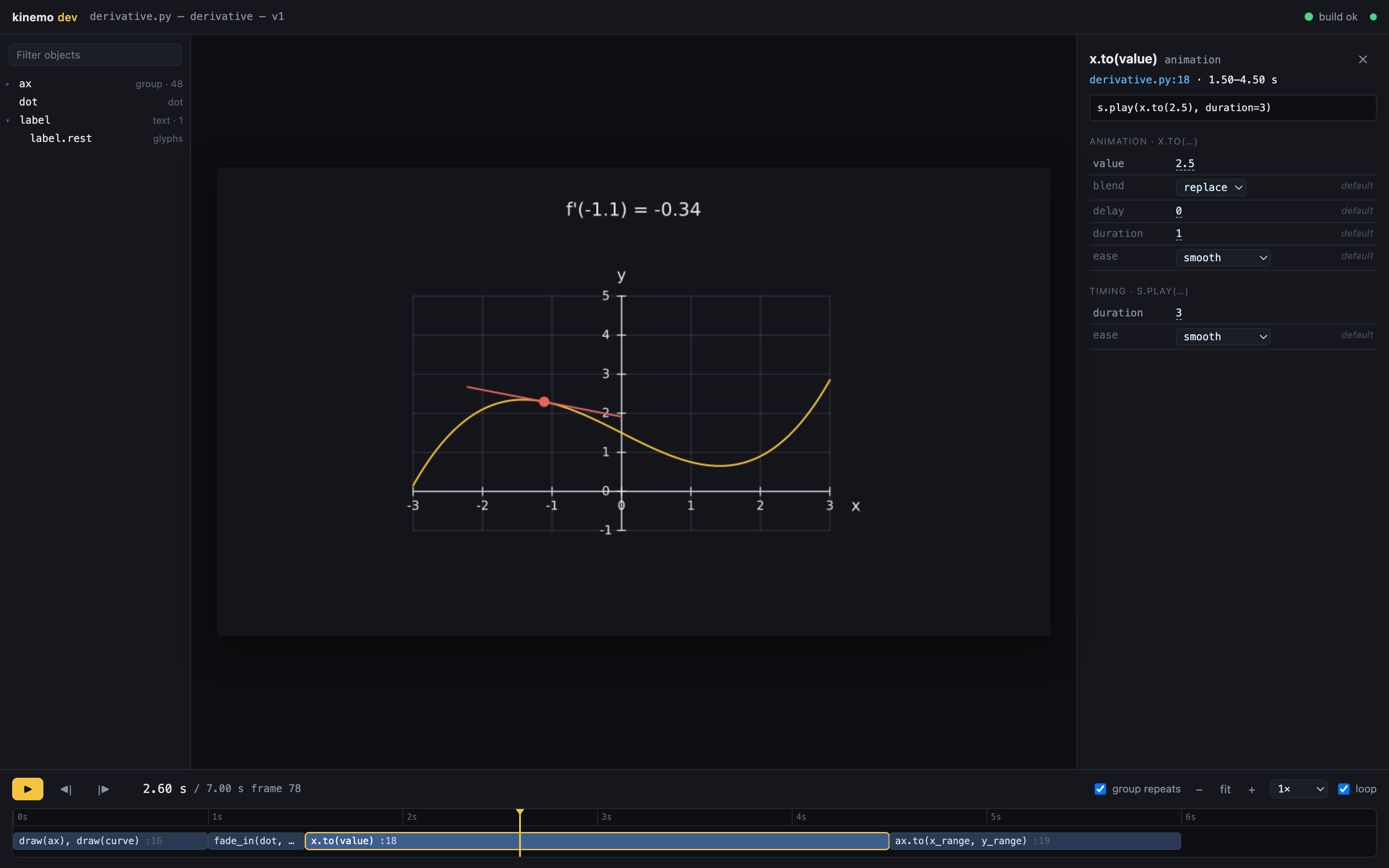
s.play that scheduled
it, including the ones it leaves out, with their defaults.Examples
Complete scenes from the repository. Each one passes kinemo check --strict, runs
in the test suite and was rendered by kinemo for this page. Hover to play.
Hello
The smallest scene: write a title, then animate its color and scale.
Bubble sort
Ordinary Python logic in the build phase drives a sorting animation: bars reflow when swapped, comparisons are highlighted with
s.during, ands.tempoaccelerates the run.Derivative
A tangent slides along a curve while a reactive label shows the slope; the axes zoom at the end.
Pythagoras
Squares built on the sides of a right triangle, a clip, a highlight with
s.duringand a structural morph between two equations.A day with solar + battery
A component integrates power into a state of charge, fires
full/emptyevents with hysteresis, and reads its clock from a context; the load curve comes from a polars DataFrame.Bouncing ball
A fixed-step simulation with typed events; each impact squashes the ball and the script waits for the third bounce.
Parametric polygon
A scene parameter drives the number of sides (
kinemo render --param n=8).Energy bar chart
A bar chart built from a polars DataFrame transitions to new data: bars grow, reorder and enter by key.
Vector field
A vector field, animated stream lines and thousands of points with per-point colors, all evaluated natively.
Budgets, measured
The test suite fails when kinemo misses these. The right column was measured when this site's data was exported (Linux x86_64, Python 3.13, best of several runs).
| What | Budget | This build |
|---|---|---|
| import kinemo | < 150 ms | 106 ms |
| kinemo check, bubble sort (build, resolve, lints) | < 300 ms | 108 ms |
| rebuild after a save, a day of solar power with events | < 500 ms | 53 ms |
| one preview frame at draft quality | < 30 ms | 4.4 ms |
| final 1080p render of 11.6 s of video | ≥ real time (1×) | 0.9× real time |
Readable by people and by agents
The API has one form per concept and full typing, so code written by a model checks the same way yours does. Agents close the write, verify, fix loop without needing vision:
kinemo check --jsonandkinemo inspect --jsonreport the timeline, diagnostics and scene graph as stable JSON.kinemo snap scene.py --at 2.5writes the frames worth looking at.kinemo mcpserves check, inspect, snap, docs and explain over the Model Context Protocol.- llms.txt is the whole API in one file, generated from the code.
$ kinemo check hello.py --json
{
  "file": "hello.py",
  "scenes": [
    {
      "name": "hello",
      "ok": true,
      "duration": 3.5,
      "timeline": [
        {
          "start": 0.0,
          "end": 1.0,
          "label": "write(title)",
          "file": "examples/hello.py",
          "line": 7
        },
        {
          "start": 1.0,
          "end": 2.0,
          "label": "title.to(fill, scale)",
          "file": "examples/hello.py",
          "line": 8
        }
      ],
      "diagnostics": []
    }
  ]
}
Install
Wheels for Linux, macOS and Windows, Python 3.11 or newer. Video output needs ffmpeg on your path.
Install kinemo
pip install kinemoThe extras
kinemo[numpy]andkinemo[polars]pull in the data libraries the charts can read.Start a project
kinemo new hello
cd hello
It creates
scene.py,kinemo.tomland a strictpyrightconfig.json.Preview, check, render
kinemo dev scene.py      # live preview
kinemo check scene.py    # errors and timeline, no rendering
kinemo render scene.py   # MP4; also webm, mov, gif, png, slides
Build from source
With a stable Rust toolchain and uv,
from a checkout of the repository (--features gpu adds the GPU preview):
uv venv .venv
uv pip install --python .venv/bin/python maturin
source .venv/bin/activate
maturin develop --release
Next: Getting started, the first of fifteen short guides, or the API reference.